Developer Guide
- Acknowledgements
- Setting up, getting started
- Design
- Implementation
- Documentation, logging, testing, configuration, dev-ops
-
Appendix: Requirements
- Product scope
- User stories
-
Use cases
- UC01 — Add a student contact
- UC02 — List all contacts
- UC03 — Find contacts by name/role/tags
- UC04 — Delete a contact by index
- UC05 — View help
- UC06 — Exit the application
- UC07 — Add remarks to contact
- UC08 — Delete remarks for contact
- UC09 — Add session to student
- UC10 — Delete a session for a student
- UC11 - Edit a student’s session
- Non-Functional Requirements
- Glossary
- Appendix: Instructions for manual testing
- Appendix: Planned Enhancements
Acknowledgements
- General: AI is used during coding as an auto-complete tool, to help to standardize formatting, improve JavaDocs clarity and test files
- ChatGPT: https://chatgpt.com/
- Gemini: https://gemini.google.com/app
- Gradle — build scripts and dependency management: https://gradle.org/
- Jackson (FasterXML) — JSON read/write helpers: https://github.com/FasterXML/jackson
- Jekyll - used to generate app website: https://jekyllrb.com/
- JUnit 5 — unit testing framework: https://junit.org/junit5/
- OpenJFX (JavaFX) — UI components and FXML usage: https://openjfx.io/
- OpenJDK / Java 17 — target runtime: https://openjdk.org/
- PlantUML — used to author sequence/class/activity diagrams: https://plantuml.com/
- SE-EDU AddressBook Level 3 project — used as the primary template for architecture, componentization and many example snippets: https://github.com/se-edu/addressbook-level3
Setting up, getting started
Refer to the guide Setting up and getting started.
Design
 Tip: The
 .puml files used to create diagrams are in this document docs/diagrams folder. Refer to the PlantUML Tutorial at se-edu/guides to learn how to create and edit diagrams.
Architecture
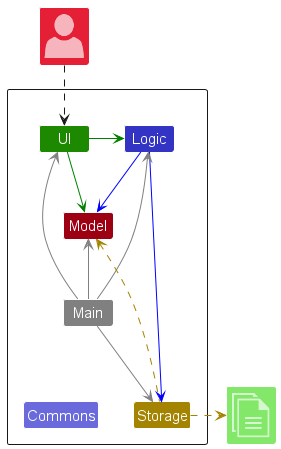
The Architecture Diagram given above explains the high-level design of the App.
Given below is a quick overview of main components and how they interact with each other.
Main components of the architecture
Main (consisting of classes Main and MainApp) is in charge of the app launch and shut down.
- At app launch, it initializes the other components in the correct sequence, and connects them up with each other.
- At shut down, it shuts down the other components and invokes cleanup methods where necessary.
The bulk of the app’s work is done by the following four components:
-
UI: The UI of the App. -
Logic: The command executor. -
Model: Holds the data of the App in memory. -
Storage: Reads data from, and writes data to, the hard disk.
Commons represents a collection of classes used by multiple other components.
How the architecture components interact with each other
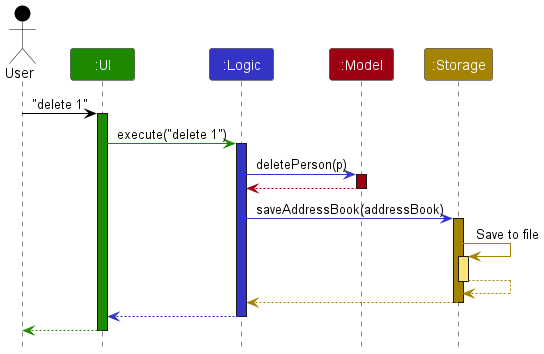
The Sequence Diagram below shows how the components interact with each other for the scenario where the user issues the command delete 1.
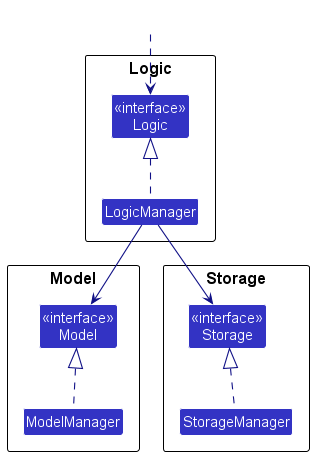
Each of the four main components (also shown in the diagram above),
- defines its API in an
interfacewith the same name as the Component. - implements its functionality using a concrete
{Component Name}Managerclass (which follows the corresponding APIinterfacementioned in the previous point.
For example, the Logic component defines its API in the Logic.java interface and implements its functionality using the LogicManager.java class which follows the Logic interface. Other components interact with a given component through its interface rather than the concrete class (reason: to prevent outside component’s being coupled to the implementation of a component), as illustrated in the (partial) class diagram below.
The sections below give more details of each component.
UI component
The API of this component is specified in Ui.java
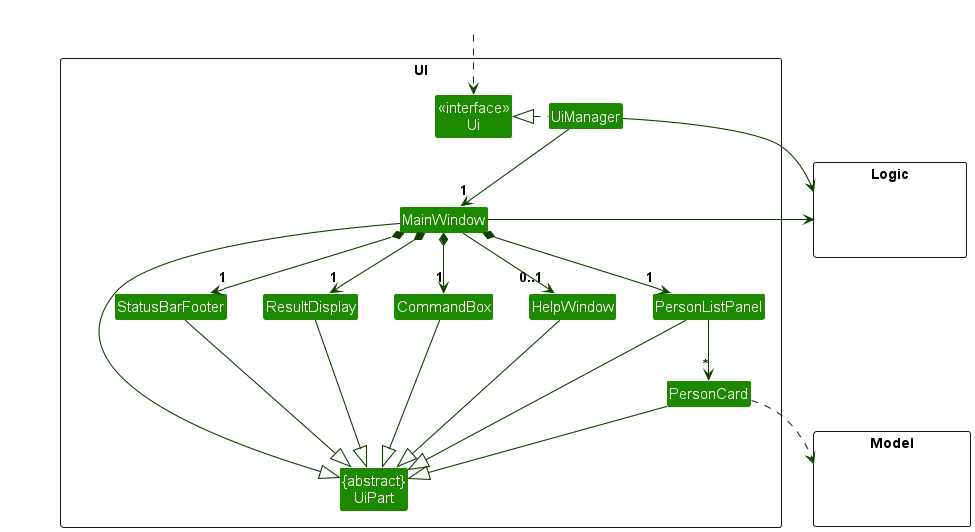
The UI consists of a MainWindow that is made up of parts e.g.CommandBox, ResultDisplay, PersonListPanel, PersonCountPanel, StatusBarFooter etc. All these, including the MainWindow, inherit from the abstract UiPart class which captures the commonalities between classes that represent parts of the visible GUI.
The UI component uses the JavaFx UI framework. The layout of these UI parts are defined in matching .fxml files that are in the src/main/resources/view folder. For example, the layout of the MainWindow is specified in MainWindow.fxml
The UI component,
- executes user commands using the
Logiccomponent. - listens for changes to
Modeldata so that the UI can be updated with the modified data. - keeps a reference to the
Logiccomponent, because theUIrelies on theLogicto execute commands. - depends on some classes in the
Modelcomponent, as it displaysPersonobject residing in theModel.
Logic component
API : Logic.java
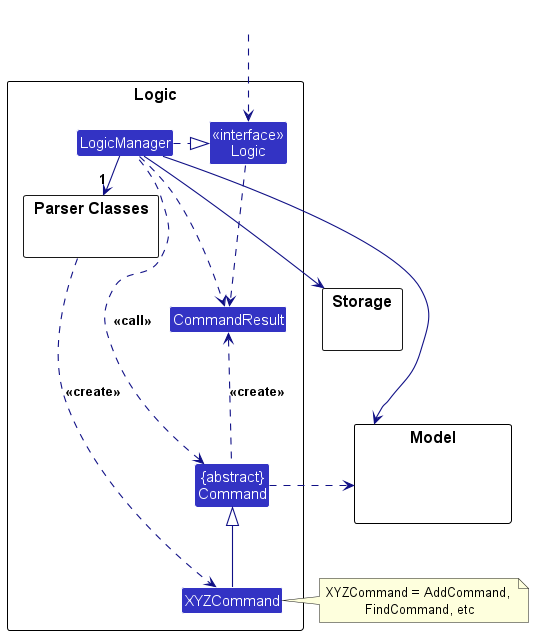
Here’s a (partial) class diagram of the Logic component:
The sequence diagram below illustrates the interactions within the Logic component, taking execute("delete 1") API call as an example.
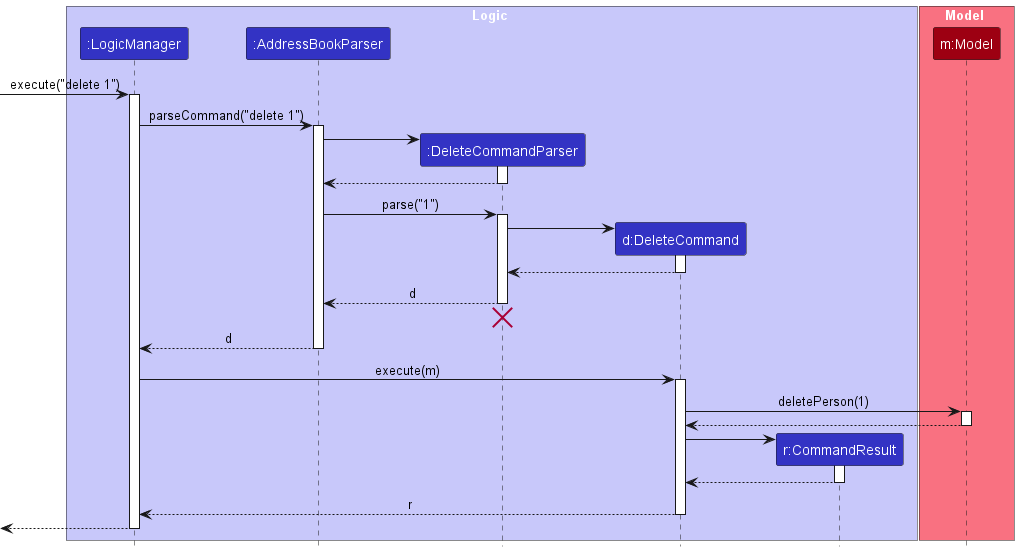
 Note: The lifeline for
 DeleteCommandParser should end at the destroy marker (X) but due to a limitation of PlantUML, the lifeline continues till the end of diagram.
How the Logic component works:
- When
Logicis called upon to execute a command, it is passed to anAddressBookParserobject which in turn creates a parser that matches the command (e.g.,DeleteCommandParser) and uses it to parse the command. - This results in a
Commandobject (more precisely, an object of one of its subclasses e.g.,DeleteCommand) which is executed by theLogicManager. - The command can communicate with the
Modelwhen it is executed (e.g. to delete a person).
Note that although this is shown as a single step in the diagram above (for simplicity), in the code it can take several interactions (between the command object and theModel) to achieve. - The result of the command execution is encapsulated as a
CommandResultobject which is returned back fromLogic.
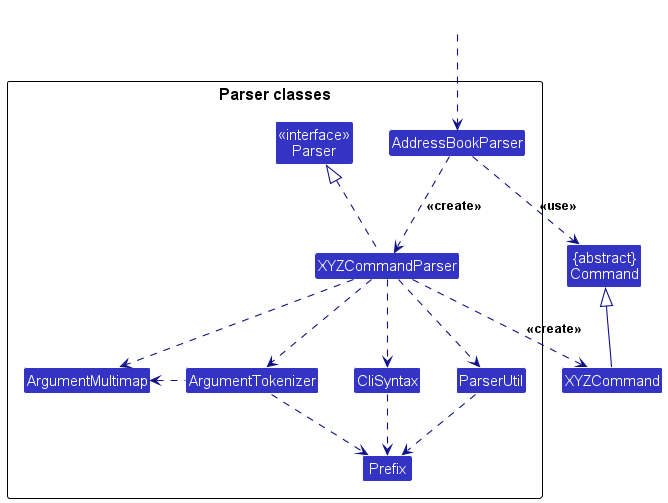
Here are the other classes in Logic (omitted from the class diagram above) that are used for parsing a user command:
How the parsing works:
- When called upon to parse a user command, the
AddressBookParserclass creates anXYZCommandParser(XYZis a placeholder for the specific command name e.g.,AddCommandParser) which uses the other classes shown above to parse the user command and create aXYZCommandobject (e.g.,AddCommand) which theAddressBookParserreturns back as aCommandobject. - All
XYZCommandParserclasses (e.g.,AddCommandParser,DeleteCommandParser, …) inherit from theParserinterface so that they can be treated similarly where possible e.g, during testing.
Model component
API : Model.java
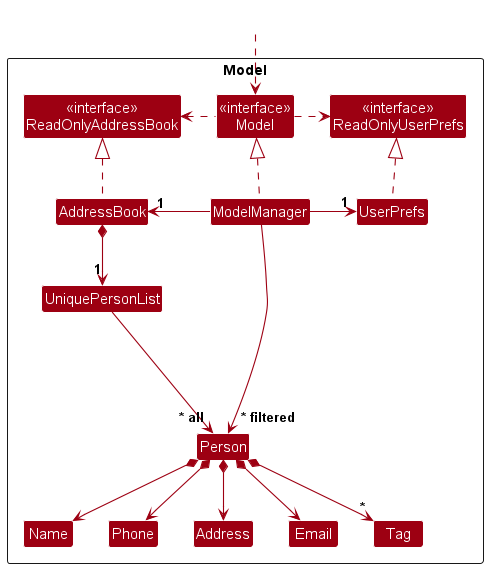
The Model component,
- stores the data of EduConnect i.e., all
Personobjects (which are contained in aUniquePersonListobject). - stores the currently ‘selected’
Personobjects (e.g., results of a search query) as a separate filtered list which is exposed to outsiders as an unmodifiableObservableList<Person>that can be ‘observed’ e.g. the UI can be bound to this list so that the UI automatically updates when the data in the list change. - stores a
UserPrefobject that represents the user’s preferences. This is exposed to the outside as aReadOnlyUserPrefobjects. - does not depend on any of the other three components (as the
Modelrepresents data entities of the domain, they should make sense on their own without depending on other components)
Note: An alternative (arguably, a more OOP) model is given below. It has a Tag list in the AddressBook, which Person references. This allows AddressBook to only require one Tag object per unique tag, instead of each Person needing their own Tag objects.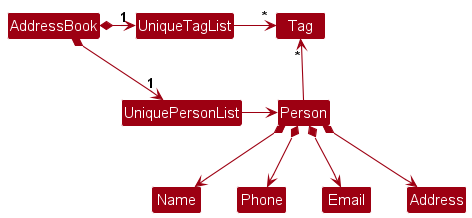
Storage component
API : Storage.java
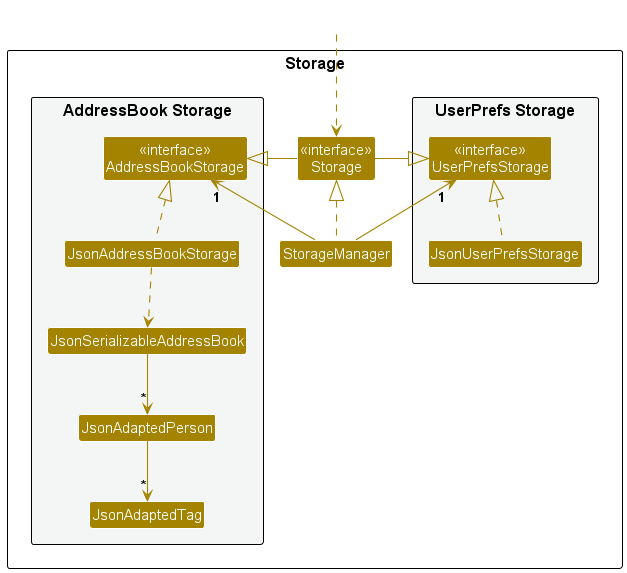
The Storage component,
- can save both data of EduConnect and user preference data in JSON format, and read them back into corresponding objects.
- inherits from both
AddressBookStorageandUserPrefStorage, which means it can be treated as either one (if only the functionality of only one is needed). - depends on some classes in the
Modelcomponent (because theStoragecomponent’s job is to save/retrieve objects that belong to theModel)
Common classes
Classes used by multiple components are in the seedu.address.commons package.
Implementation
This section describes some noteworthy details on how certain features are implemented.
Add Person feature
This command allows a user to add a contact (Student/Parent) into EduConnect. You cannot add duplicate contacts into EduConnect.
Definition of Duplicate Contact: A contact with the same name as an existing contact.
Tutors often manage dozens of students and their parents.
To keep their contact list concise and organised, EduConnect prevents duplicate contacts (same name) from being added.
This ensures data integrity and reduces the risk of confusion during communication or scheduling.
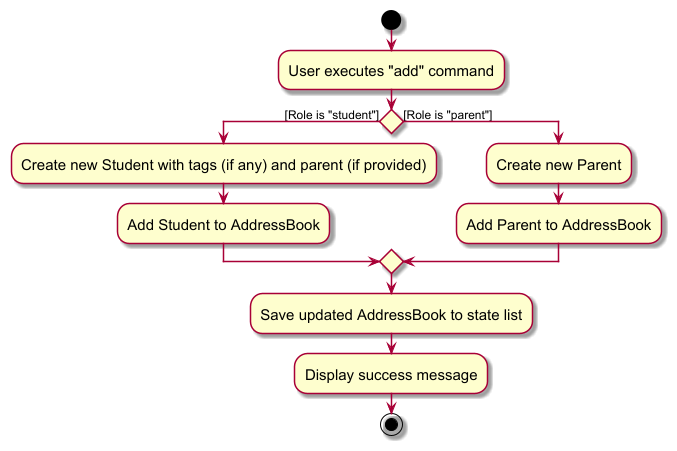
The following truncated activity diagram summarizes what happens when a user executes an add person command:
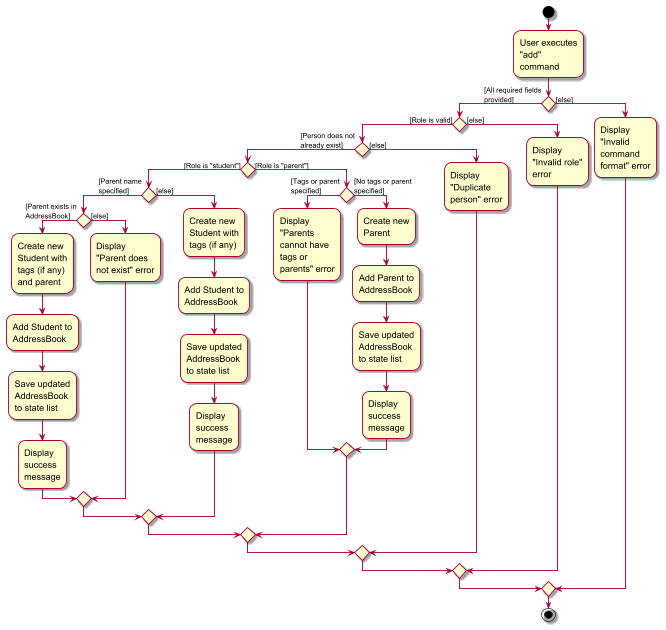
The following activity diagram fully summarizes what happens when a user executes an add person command:
Edit Person feature
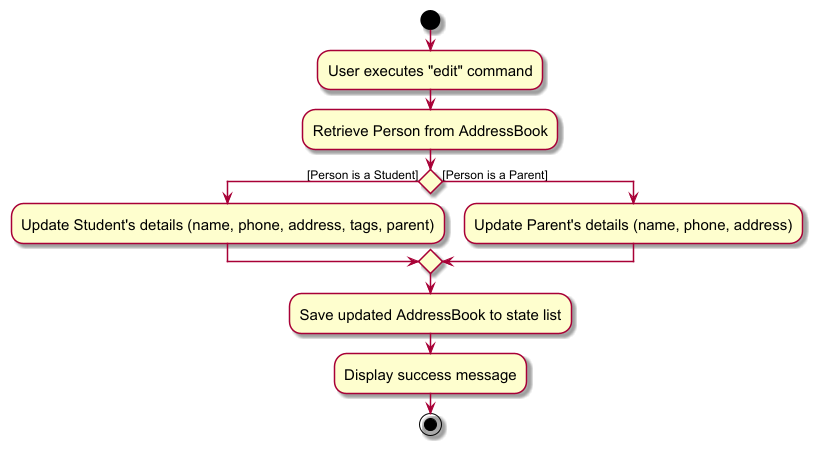
The following truncated activity diagram summarizes what happens when a user executes an edit person command:
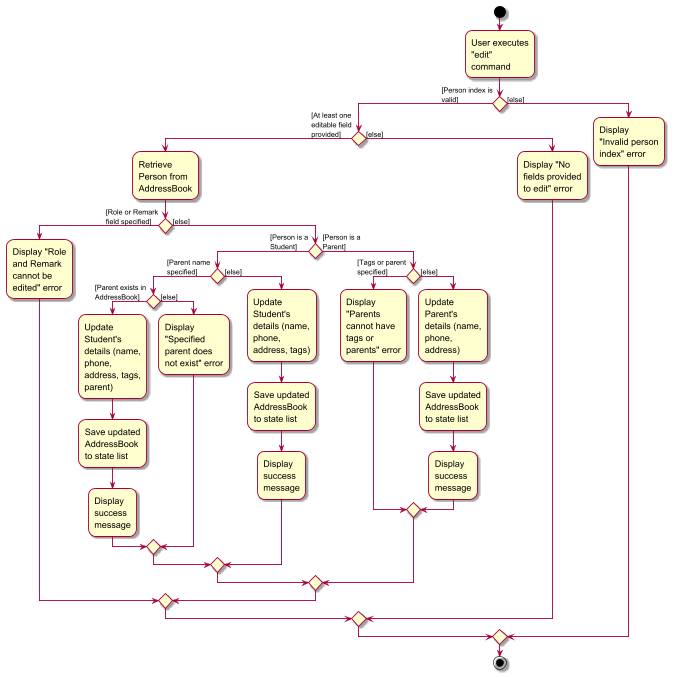
The following activity diagram fully summarizes what happens when a user executes an edit person command:
Remark feature
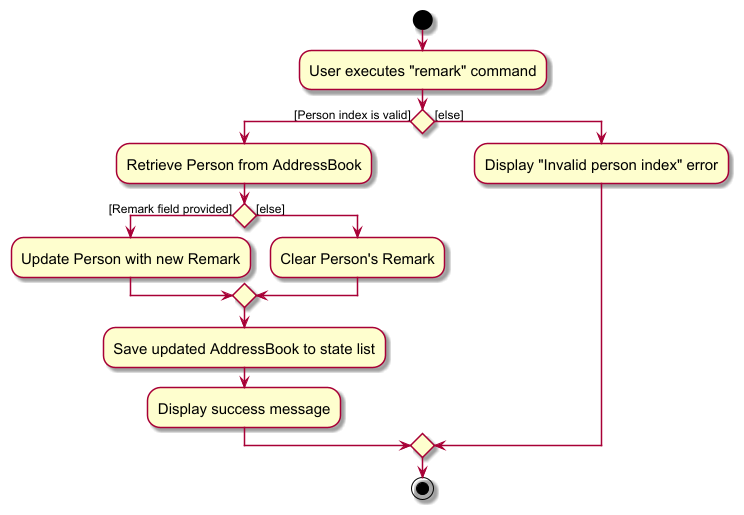
The following activity diagram summarizes what happens when a user executes a remark command:
Add Session feature
For the Add Session command, only the standard day formats — Mon, Tue, Wed, Thur, Fri, Sat, Sun or their full forms (e.g., Monday, Friday) are accepted to keep inputs consistent.
However, the View Session command is more flexible and also recognizes Thu or Thurs for convenience.
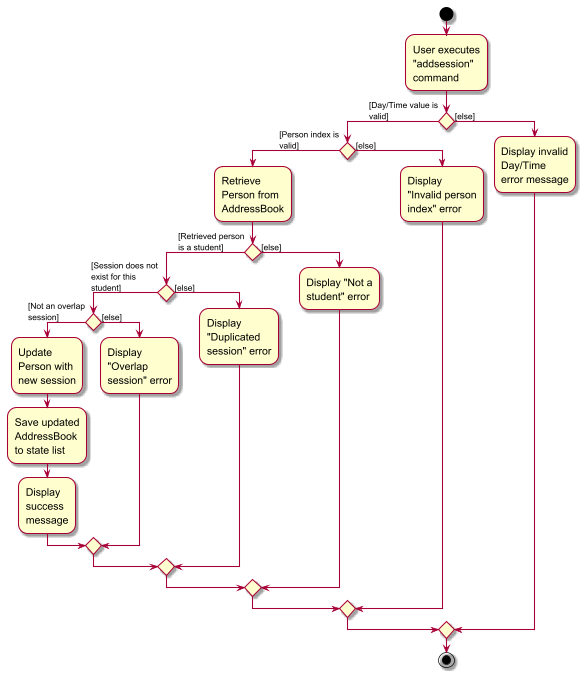
Currently, the system does not allow overlapping sessions for the same student. A single student cannot be scheduled for two different sessions that overlap each other. However, adding the same session time among multiple students is allowed. This design facilitates the scheduling of group sessions where one tutor meets with several students simultaneously.
The following activity diagram summarizes what happens when a user executes an add session command:
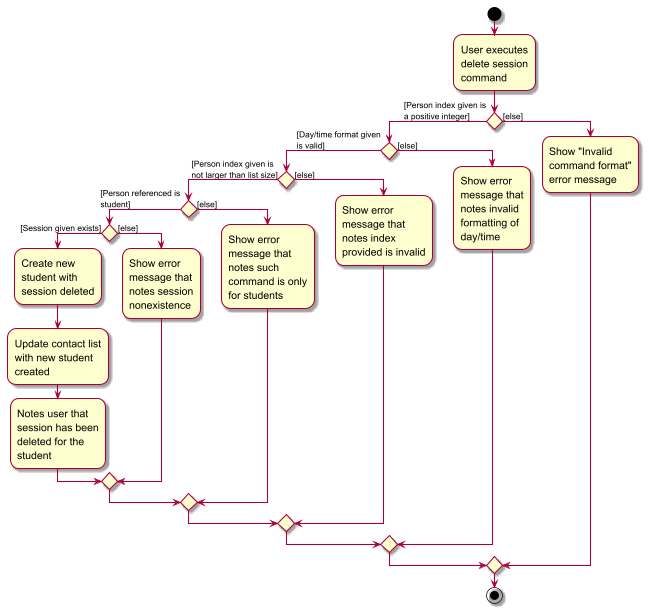
Delete Session feature
The following activity diagram summarizes what happens when a user executes a delete session command:
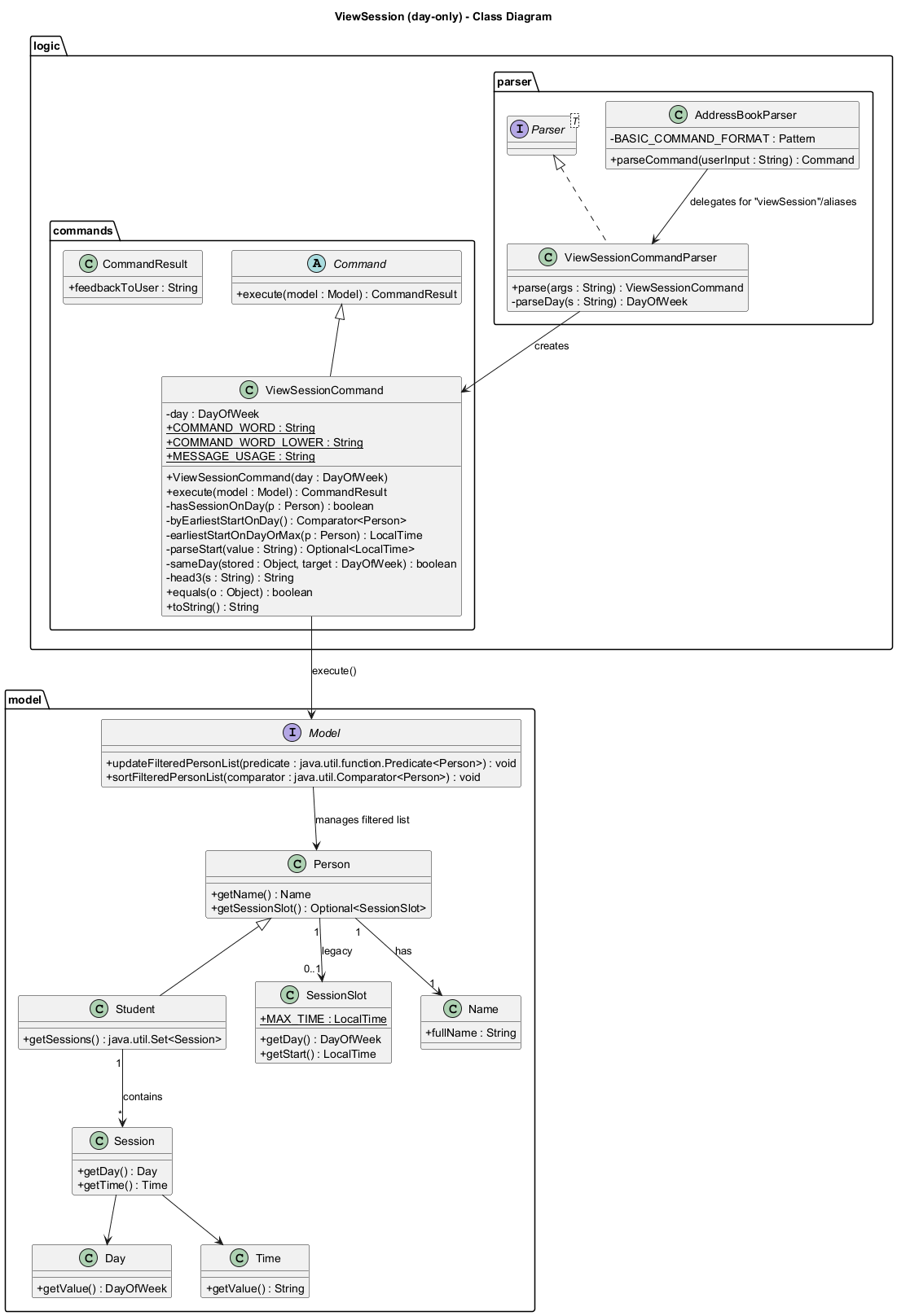
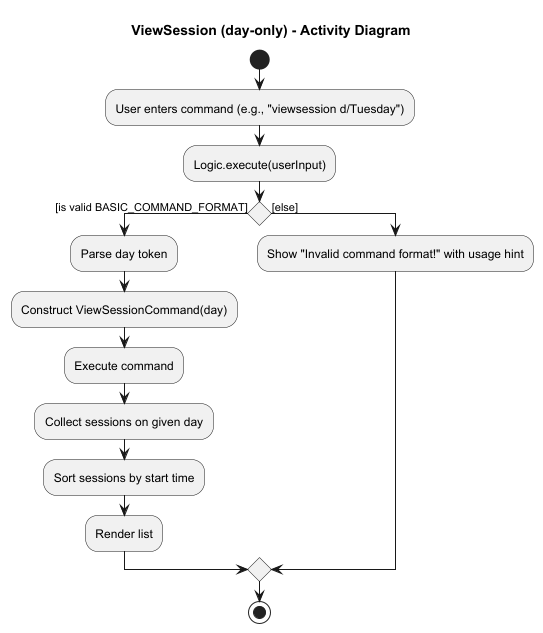
View Session feature (day-only)
To give more flexibility, we allow recognition of multiple valid input for day formats:
-
tueandtuesare both recognised astuesday -
thu,thurandthursare all recognised asthursday
Intent
List all students who have at least one session on a specified weekday, ordered by the earliest start time on that day. Supports both legacy single SessionSlot and the newer multi-session Student.sessions.
Command format
viewsession: List all sessions on a day; earliest first.
Parameters: d/DAY
Example: viewsession d/Tuesday
Edit session
The edit session command modifies an existing session in EduConnect. The implementation involves the following steps:
- Parsing: The command is parsed to extract the relevant information such as the index of the student, the day and time of the session, and the new day and time of the session if applicable.
- Validation: The command is validated to ensure that the index of the student is valid and that the new day and time of the session (if applicable) are valid.
- Execution: The session is modified in EduConnect. If the new day and time of the session are applicable, the session is updated with the new day and time. Otherwise, the session is deleted.
-
Committing: The state of EduConnect is committed to the
addressBookStateList. ThecurrentStatePointeris not changed as the user is not undoing or redoing any commands. -
Saving the state: The
addressBookStateListis saved to disk to persist the state of EduConnect.
The edit session mechanism is facilitated by EditSessionCommand and EditSessionCommandParser. It extends Command and implements the following key operations:
-
EditSessionCommand#execute()- Executes the command to edit a session -
EditSessionCommand#toCopy()- Creates a newPersonwith the updated session -
EditSessionCommandParser#parse()- Parses the user input and creates a newEditSessionCommand
Given below is an example usage scenario and how the edit session mechanism behaves at each step.
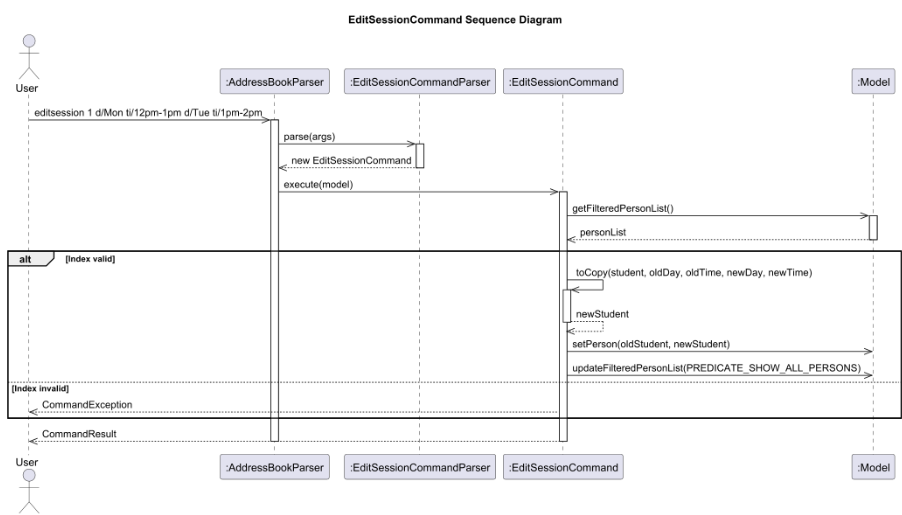
Example Usage Scenario
- The user executes
editsession 1 d/Mon ti/12pm-1pm d/Tue ti/1pm-2pmto change a session from Monday 12pm-1pm to Tuesday 1pm-2pm for the first student in the list. - The
AddressBookParseridentifies the command wordeditsessionand creates a newEditSessionCommandParser. - The
EditSessionCommandParserparses the arguments and creates a newEditSessionCommandwith the provided index, old session details, and new session details. - The
EditSessionCommandis executed, which:- Retrieves the target student from the filtered person list
- Verifies the student exists and has the specified session
- Creates a new
Studentobject with the updated session - Replaces the original student with the updated one in the model
- Updates the filtered person list
Sequence Diagram
Design Considerations
Aspect: How edit session executes:
-
Alternative 1 (current choice): Create a new Student object with updated sessions
- Pros: Immutable objects ensure thread safety and make the code easier to reason about
- Cons: Slight performance overhead due to object creation
-
Alternative 2: Modify the existing Student object
- Pros: Better performance as no new object is created
- Cons: Mutable state can lead to bugs in a multithreaded environment
Aspect: Error handling:
The command includes comprehensive error handling for cases such as:
- Invalid index
- Missing or invalid parameters
- Non-existent session
- Attempting to edit a non-student’s session
Documentation, logging, testing, configuration, dev-ops
Appendix: Requirements
Product scope
Target user profile:
- has a need to manage a significant number of contacts
- prefer desktop apps over other types
- can type fast
- prefers typing to mouse interactions
- is reasonably comfortable using CLI apps
Value proposition: Helps private tutors efficiently manage student and parent contact information, ensuring quick access to details and smooth communication
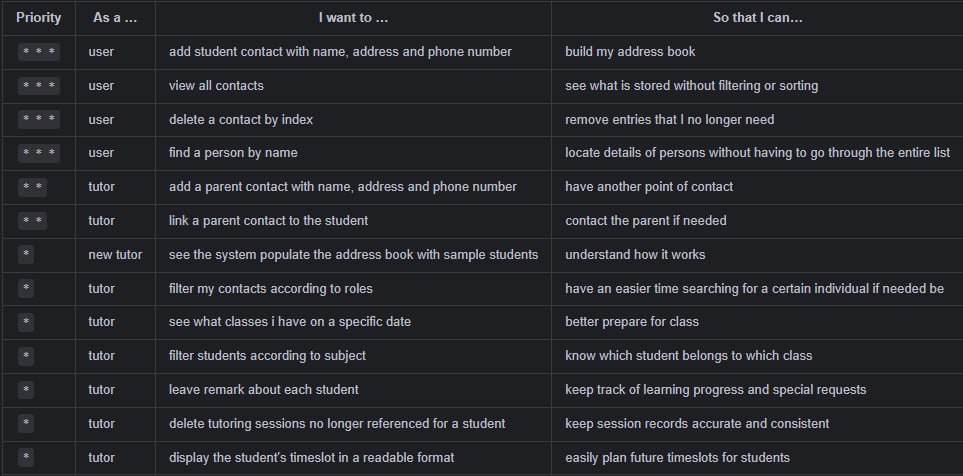
User stories
Priorities:
- High (must have):
* * * - Medium (nice to have):
* * - Low (unlikely to have):
*
Use cases
(For all use cases below, the System is EduConnect and the Actor is the user, unless specified otherwise.)
UC01 — Add a student contact
Goal: Create a new student entry with name, address, and phone.
Precondition: Application is running; storage is writable.
Main Success Scenario (MSS)
- User enters
add n/NAME a/ADDRESS p/PHONE r/student. - System validates fields and creates the contact.
- System confirms creation and displays the new contact.
Use case ends.
Extensions
- 2a. Validation fails (e.g., invalid name/phone, missing field).
- 2a1. System shows error and usage hint. Resume at step 1.
- 2b. Duplicate contact detected by exact same name and phone.
- 2b1. System warns about duplicate and aborts creation.
Use case ends.
- 2b1. System warns about duplicate and aborts creation.
UC02 — List all contacts
Goal: Show every stored contact without filtering or sorting.
Precondition: Application is running.
MSS
- User enters
list. - System displays all contacts in index order.
Use case ends.
Extensions
- 2a. EduConnect is empty.
- 2a1. System displays “no contacts” placeholder.
Use case ends.
- 2a1. System displays “no contacts” placeholder.
UC03 — Find contacts by name/role/tags
Goal: Locate contacts by case-insensitive name matching, role and tags.
Precondition: At least one contact exists.
MSS
- User enters
find n/NAMEorfind r/ROLEorfind n/NAME r/ROLEorfind t/TAGSorfind n/NAME r/ROLE t/TAGS, etc. - System filters contacts whose names, role and tag (provided that corresponding fields are provided) contain any of the provided keywords.
- System displays the filtered list with new indices.
Use case ends.
Extensions
- 2a. No matches found.
- 2a1. System shows empty result.
Use case ends.
- 2a1. System shows empty result.
UC04 — Delete a contact by index
Goal: Remove one contact referenced by the current visible index.
Precondition: At least one contact is visible (e.g., after list or find).
MSS
- User enters
delete IwhereIis a 1-based index in the current list. - System deletes the referenced contact.
- System confirms deletion and updates the visible list.
Use case ends.
Extensions
- 1a.
Iis not a valid visible index (≤0 or > list size, or non-integer).- 1a1. System shows error and keeps list unchanged.
Use case ends.
- 1a1. System shows error and keeps list unchanged.
- 2a. Underlying data changed between list and delete (rare race).
- 2a1. System rejects operation and asks user to refresh (
list).
Use case ends.
- 2a1. System rejects operation and asks user to refresh (
UC05 — View help
Goal: Display user guide that contains command summaries and usage.
Precondition: Application is running.
MSS
- User enters
help. - System opens help window/panel with link to user guide.
Use case ends.
UC06 — Exit the application
Goal: Close the application gracefully.
Precondition: Application is running.
MSS
- User enters
exit(or clicks the window close button). - System persists preferences, releases resources, and terminates.
Use case ends.
UC07 — Add remarks to contact
Goal: Add remarks for each contact to keep track of their learning progress and special requests.
Precondition: At least one contact exists.
MSS
- User enters
remark I rm/REMARKwhereIis a 1-based index in the current list. - System adds remark to referenced contact.
- System confirms addition of remark and updates the list.
Use case ends.
Extensions
- 1a.
Iis not a valid visible index (≤0 or > list size, or non-integer).- 1a1. System shows error and keeps list unchanged.
Use case ends.
- 1a1. System shows error and keeps list unchanged.
UC08 — Delete remarks for contact
Goal: Delete remarks for each contact to remove clutter.
Precondition: At least one contact exists.
MSS
- User enters
remark IwhereIis a 1-based index in the current list. - System deletes remark (if any) to referenced contact.
- System confirms deletion of remark and updates the list.
Use case ends.
Extensions
- 1a.
Iis not a valid visible index (≤0 or > list size, or non-integer).- 1a1. System shows error and keeps list unchanged.
Use case ends.
- 1a1. System shows error and keeps list unchanged.
UC09 — Add session to student
Goal: Add session to update the classes the student is in.
Precondition: The student exists.
MSS
- User enters
addsession I d/DAY ti/TIMEwhereIis a 1-based index in the current list. - System adds session to referenced student.
- System confirms addition of session to student and updates the list.
Use case ends.
Extensions
- 1a.
Iis not a valid visible index (≤0 or > list size, or non-integer).- 1a1. System shows error and keeps list unchanged.
Use case ends.
- 1a1. System shows error and keeps list unchanged.
- 1b. Validation fails (e.g., invalid day/time or both)
- 1b1. System shows error and usage hint.
Use case ends.
- 1b1. System shows error and usage hint.
- 1c. Adding to a parent contact
- 1c1. System shows an error message and keeps list unchanged.
Use case ends.
- 1c1. System shows an error message and keeps list unchanged.
- 1d. Duplicate session detected by exact same day and time.
- 1b1. System warns about duplicate and aborts creation.
Use case ends.
- 1b1. System warns about duplicate and aborts creation.
UC10 — Delete a session for a student
Goal: Delete a tutoring session for a student that is no longer referenced/required.
Precondition: At least one student exists, and at least one session exists for such student.
MSS
- User enters
deletesession I d/DAY ti/TIMEwhereIis a 1-based index in the current list. - System deletes the corresponding session for the student.
- System confirms deletion of session and updates the list.
Use case ends.
Extensions
- 1a.
Iis not a valid visible index (≤0 or > list size, or non-integer).- 1a1. System shows an error message and keeps list unchanged.
Use case ends.
- 1a1. System shows an error message and keeps list unchanged.
- 1b. Validation fails (e.g., invalid day/time or both)
- 1b1. System shows error and usage hint.
Use case ends.
- 1b1. System shows error and usage hint.
- 1c. User attempts to delete a tutoring session for a parent contact.
- 1c1. System shows an error message and keeps list unchanged.
Use case ends.
- 1c1. System shows an error message and keeps list unchanged.
- 1d. User attempts to delete a nonexistent tutoring session for a student.
- 1d1. System warns about nonexistence and aborts deletion.
Use case ends.
- 1d1. System warns about nonexistence and aborts deletion.
UC11 - Edit a student’s session
Goal: Edit a student’s session to update the classes the student is in.
Precondition: The student exists.
MSS
- User enters
editsession I d/DAY ti/TIME nd/DAY nti/TIMEwhereIis a 1-based index in the current list. - System updates the student’s session with the new details.
- System displays a success message confirming the session was edited
Use case ends.
Extensions
- 1a. The given index is invalid.
- 1a1. System shows error and keeps list unchanged.
Use case ends.
- 1a1. System shows error and keeps list unchanged.
- 1b. Validation fails (e.g., invalid day/time)
- 1b1. System shows error and usage hint.
Use case ends.
- 1b1. System shows error and usage hint.
- 1c. Editing to a parent contact
- 1c1. System shows error and keeps list unchanged.
Use case ends.
- 1c1. System shows error and keeps list unchanged.
Non-Functional Requirements
Portability
- Should work on any mainstream OS as long as it has Java
17or above installed.
Performance & Efficiency
- Should be able to hold up to 1000 persons without a noticeable sluggishness in performance for typical usage.
- A user with above average typing speed for regular English text (i.e. not code, not system admin commands) should be able to accomplish most of the tasks faster using commands than using the mouse.
Reliability & Availability
- The application should not crash or lose data under normal usage conditions (adding, viewing, deleting contacts).
- The application should be able to recover gracefully from invalid inputs without terminating unexpectedly.
Usability
- Error messages should be clear, concise, and actionable, enabling the user to correct mistakes quickly.
- Command feedback (success/error outputs) must be displayed in under 0.5 seconds to maintain responsiveness.
- The system should preserve the user’s original casing (e.g., “Alice Tan” not “alice tan”) to avoid frustration.
Maintainability & Extensibility
- The system should be designed so that new features (e.g., search, filter, update contact) can be integrated with minimal modification to existing code.
- All source code should be documented with clear method/class descriptions to support future maintenance.
Glossary
- Mainstream OS: Windows, Linux, Unix, MacOS
- Private contact detail: A contact detail that is not meant to be shared with others
- Tutor: A user of EduConnect who manages and tracks their students’ and parents’ contact information
- Student: An individual who is taught by a tutor. Their contact information is stored in EduConnect
- Parent: The guardian or person linked to a student. Their contact information may be stored in EduConnect
-
Role: A label assigned to each contact, indicating whether they are a
Studentor aParent -
Session: A timeslot which a Student attends a lesson with the tutor. This only applies to
Student -
Tag: A label indicating the subject a Student is taking under the tutor. This only applies to
Student
Appendix: Instructions for manual testing
Given below are instructions to test the app manually.
Note: These instructions only provide a starting point for testers to work on;
testers are expected to do more exploratory testing.
Launch and shutdown
-
Initial launch
-
Download the jar file and copy into an empty folder
-
Double-click the jar file Expected: Shows the GUI with a set of sample contacts. The window size may not be optimum.
-
-
Saving window preferences
-
Resize the window to an optimum size. Move the window to a different location. Close the window.
-
Re-launch the app by double-clicking the jar file.
Expected: The most recent window size and location is retained.
-
Adding a Person
-
Adding a Parent
-
Prerequisites:
- Another Person with these names in the test cases do not already exist inside EduConnect.
- Test Case - Adding a Parent (Success)
add n/Klaus Tay p/99837264 a/Cruise Centre 1 Maritime Square #02-127, 099253 r/parent
Expected:- Success Message: “New person added: Klaus Tay; Phone: 99837264; Address: Cruise Centre 1 Maritime Square #02-127, 099253; Role: parent; Remark: ; Children: []”
- New person named Klaus Tay added to the contact list, the person should be tagged as a Parent.
- New person should appear at the bottom of the contacts list. If person does not appear, run the
listcommand to verify the full list of contacts.
- Test Case - Adding a Parent with Tags (Failure)
add n/Bob Lee p/89658345 a/150 SOUTH BRIDGE ROAD 11-04 FOOK HAI BUILDING r/parent t/math
Expected:- Error Message: “Parents are NOT allowed to have tags!”
- Invalid person is not added to EduConnect.
- Test Case - Adding a Parent with a Parent (Failure)
add n/Peter Peterson p/92272634 a/123 Lorong 1 Toa Payoh #02-515, 310986 r/parent par/Bob Lee
Expected:- Error Message: “Parents are NOT allowed to have parents!”
- Invalid person is not added to EduConnect.
- Test Case - Adding a Parent (Success)
- Another Person with these names in the test cases do not already exist inside EduConnect.
-
Prerequisites:
-
Adding a Student
-
Prerequisites:
- Another Person with these names in the test cases do not already exist inside EduConnect.
- Already completed the previous section on Adding a Parent.
- Test Case - Adding a Student without Tags (Success)
add n/Orion Lee p/98273648 a/1 HarbourFront Walk, Singapore 098585 r/student
Expected:- Success Message: “New person added: Orion Lee; Phone: 98273648; Address: 1 HarbourFront Walk, Singapore 098585; Role: student; Remark: ; Tags: ; Parent: null”
- New person named Orion Lee added to the contact list, the person should be tagged as a Student.
- New person should appear at the bottom of the contacts list. If person does not appear, run the
listcommand to verify the full list of contacts.
- Test Case - Adding a Student with Tags (Success)
add n/Akira Lee p/98278876 a/67 Millenia Walk, Singapore 194585 r/student t/english
Expected:- Success Message: “New person added: Akira Lee; Phone: 98278876; Address: 67 Millenia Walk, Singapore 194585; Role: student; Remark: ; Tags: [english]; Parent: null”
- New person named Akira Lee added to the contact list, the person should be tagged as a Student.
- New person should appear at the bottom of the contacts list. If person does not appear, run the
listcommand to verify the full list of contacts.
- Test Case - Adding a Student with Parent’s name (Success)
add n/Ray Lee p/98927376 a/123 Lorong 1 Toa Payoh 02-515 224585 r/student par/Klaus Tay
Expected:- Success Message: “New person added: Ray Lee; Phone: 98927376; Address: 123 Lorong 1 Toa Payoh 02-515 224585; Role: student; Remark: ; Tags: ; Parent: Klaus Tay”
- New person named Ray Lee added to the contact list, the person should be tagged as a Student.
- New person should appear at the bottom of the contacts list. If person does not appear, run the
listcommand to verify the full list of contacts.
- Test Case - Adding a Student with Tags and Parent’s name (Success)
add n/Shermaine Lee p/98927376 a/Aljunied Industrial Complex 623 Aljunied Road #02-01 r/student t/science par/Klaus Tay
Expected:- Success Message: “New person added: Shermaine Lee; Phone: 98927376; Address: Aljunied Industrial Complex 623 Aljunied Road #02-01; Role: student; Remark: ; Tags: [science]; Parent: Klaus Tay”
- New person named Shermaine Lee added to the contact list, the person should be tagged as a Student.
- New person should appear at the bottom of the contacts list. If person does not appear, run the
listcommand to verify the full list of contacts.
- Test Case - Adding a Student with a non-existent Parent
add n/Germaine Lee p/98927376 a/334 Aljunied Street Road #02-02 r/student par/Nonexistent Parent
Expected:- Error Message: “This parent does not exist in the EduConnect.”
- Invalid person is not added to the EduConnect.
- Test Case - Adding a Student with an Invalid Parent
add n/Germaine Lee p/98927376 a/334 Aljunied Street Road #02-02 r/student par/3
Expected:- Error Message: “Names should only contain alphabetic characters, spaces, hyphens, apostrophes, and it should not be blank”
- Invalid person is not added to EduConnect.
- Test Case - Adding a Student without Tags (Success)
-
Prerequisites:
-
Adding a Person
-
Prerequisites:
- Another Person with these names in the test cases do not already exist inside EduConnectt.
- Please complete the previous 2 sections on Adding a Student and Adding a Parent.
- Test Case - Adding a Person with an Invalid Role (Failure)
add n/Jane Tan p/91234567 a/21 Choa Chu Kang Ave 4, #05-01 r/teacher
Expected:- Error Message: “Role should only be student or parent”
- Invalid person is not added to EduConnect.
- Test Case - Adding a Person with an Invalid Phone Number (Failure)
add n/Lim Boon Kee p/12345 a/19 Orchard Road, #03-04 r/student
Expected:- Error Message: “Phone numbers should only contain numbers, start with 8 or 9, and it should be 8 digits long”
- Invalid person is not added to EduConnect.
- Test Case - Adding a Person with an Invalid Name (Failure)
add n/@@@### p/98761234 a/21 Serangoon Avenue 1, #02-17 r/parent
Expected:- Error Message: “Names should only contain alphabetic characters, spaces, hyphens, apostrophes, and it should not be blank”
- Invalid person is not added to EduConnect.
- Test Case - Adding a Person with an Invalid Address (Failure)
add n/Amelia Tan p/98127634 a/ r/student
Expected:- Error Message: “Addresses should be between 10 - 120 characters long and can take any values except for special characters, and it should not be blank”
- Invalid person is not added to EduConnect.
- Test Case - Adding a Duplicate Person (Failure)
add n/Klaus Tay p/99837264 a/Cruise Centre 1 Maritime Square #02-127, 099253 r/parent
Expected:- Error Message: “This person already exists in EduConnect.”
- Invalid person is not added to EduConnect.
- Test Case - Adding a Person with an Invalid Role (Failure)
-
Prerequisites:
Editing a Person
Prerequisites:
- EduConnect already contains several persons from the “Adding a Person” test cases, including at least one Parent (e.g. Klaus Tay) and one Student (e.g. Akira Lee).
- Ensure that the person to be edited exists in the displayed list before performing each test case.
-
Editing a Parent
- Note: ALL the test cases in this section MUST be performed on a Parent contact or the results cannot be guaranteed.
- Please replace the
<INDEX>portion of the test case with a valid index of a Parent contact in your copy of EduConnect before running the test case. -
Prerequisites:
- There must be 1 existing Parent contact in EduConnect.
- Test Case - Editing a Parent to add Tags (Failure)
edit <INDEX> t/science
Expected:- Error Message: “Parents are NOT allowed to have tags!”
- The Parent is not updated and details remain unchanged.
- Test Case - Editing a Parent to add a Parent (Failure)
edit <INDEX> par/Bob Lee
Expected:- Error Message: “Parents are NOT allowed to have parents!”
- The Parent is not updated and details remain unchanged.
- Test Case - Editing a Parent to add Tags (Failure)
- There must be 1 existing Parent contact in EduConnect.
-
Editing a Student
- Note: ALL the test cases in this section MUST be performed on a Student contact or the results cannot be guaranteed.
- Please replace the
<INDEX>portion of the test case with a valid index of a Student contact in your copy of EduConnect before running the test case. -
Prerequisites:
- There must be 1 existing Parent contact in EduConnect.
- There must be 1 existing Student contact in EduConnect.
- Test Case - Editing a Student’s Parent (Success)
- Note: use the name of any existing parent contact in EduConnect if you do not have a Parent contact in EduConnect with the name Klaus Tay.
edit <INDEX> par/Klaus Tay
Expected: - Sample Success Message: “Edited Person: Tom Jones; Phone: 90001111; Address: 2 Keppel Road #01-05 HarbourFront, Singapore 098635; Role: student; Remark: ; Tags: [math]; Parent: Klaus Tay” - The Student’s Parent is updated to Klaus Tay (or whatever Parent’s name you put), who already exists in EduConnect. - Test Case - Editing a Student’s Tags (Success)
edit <INDEX> t/math t/science
Expected: - Sample Success Message: “Edited Person: Tom Jones; Phone: 90001111; Address: 2 Keppel Road #01-05 HarbourFront, Singapore 098635; Role: student; Remark: ; Tags: [science][math]; Parent: Klaus Tay” - The Student’s Tags are updated to math and science replacing any existing Tags. - Test Case - Clearing a Student’s Tags (Success)
edit <INDEX> t/
Expected: - Sample Success Message: “Edited Person: Tom Jones; Phone: 90001111; Address: 2 Keppel Road #01-05 HarbourFront, Singapore 098635; Role: student; Remark: ; Tags: ; Parent: Klaus Tay” - All existing Tags for the Student are removed. - Test Case - Editing a Student’s Parent to a non-existent Parent (Failure)
edit <INDEX> par/Nonexistent Parent
Expected: - Error Message: “This parent does not exist in the EduConnect.” - The specified Parent does not exist in EduConnect. - No changes are made.
- Test Case - Editing a Student’s Parent (Success)
- Note: use the name of any existing parent contact in EduConnect if you do not have a Parent contact in EduConnect with the name Klaus Tay.
-
Editing a Person
- Test Case - Editing a Person’s Address (Success)
edit 1 a/2 Keppel Road #01-05 HarbourFront, Singapore 098635
Expected:- Sample Success Message: “Edited Person: Alex Yeoh; Phone: 87438807; Address: 2 Keppel Road #01-05 HarbourFront, Singapore 098635; Role: student; Remark: ; Tags: [math]; Parent: null”
- Person’s address is updated to the new address.
- All other details remain unchanged.
- Test Case - Editing a Person’s Phone (Success)
edit 1 p/90001111
Expected:- Sample Success Message: “Edited Person: Alex Yeoh; Phone: 90001111; Address: 2 Keppel Road #01-05 HarbourFront, Singapore 098635; Role: student; Remark: ; Tags: [math]; Parent: null”
- Person’s phone number is updated to the new phone number.
- All other details remain unchanged.
- Test Case - Editing a Person’s Name (Success)
edit 1 n/Tom Jones
Expected:- Sample Success Message: “Edited Person: Tom Jones; Phone: 90001111; Address: 2 Keppel Road #01-05 HarbourFront, Singapore 098635; Role: student; Remark: ; Tags: [math]; Parent: null”
- Person’s name is updated to the new name.
- All other details remain unchanged.
- If the contact updated was a Parent, the name change will be reflected in its related Student contacts.
- Test Case - Editing with Invalid Index (Failure)
edit 999 p/91234567
Expected:- Error Message: “The person index provided is invalid”
- No changes are made because the specified index is out of range.
- Test Case - Editing with NO fields provided (Failure)
edit 1
Expected:- Error Message: “At least one field to edit must be provided.”
- No changes are made because no fields were provided.
- Test Case - Editing with Invalid Phone number (Failure)
edit 2 p/12
Expected:- Error Message: “Phone numbers should only contain numbers, start with 8 or 9 and it should be 8 digits long”
- No changes are made because the Invalid Phone number is rejected.
- Test Case - Editing with Invalid Name (Failure)
edit 2 n/$$$###
Expected:- Error Message: “Names should only contain alphabetic characters, spaces, hyphens, apostrophes, and it should not be blank”
- No changes are made because the Invalid Name is rejected.
- Test Case - Editing with Invalid Address (Failure)
edit 2 a/
Expected:- Error Message: “Addresses should be between 20 - 100 characters long and can take any values except for special characters, and it should not be blank”
- No changes are made because the Invalid Address is rejected.
- Test Case - Editing a Person’s Address (Success)
Leaving a remark
- Leaving a remark on a student/parent in the list
-
Prerequisites: List all persons using the
listcommand. Ensure at least one person is displayed in the list. -
Test case:
remark 1 rm/weak at math
Expected: First contact remark is updated to “weak at math”. The details of the remark is shown in the status message. -
Test case:
remark 1
Expected: First contact remark is removed (if any) and is updated to “”. The details of the remark is shown in the status message. -
Test case:
remark 0 rm/weak at english
Expected: No remark is added. Error details are shown in the status message. Status bar remains the same. -
Other incorrect remark commands to try:
remark,remark abc,remark 0,remark -1
Expected: Similar to previous
-
Deleting a person
-
Deleting a person while all persons are being shown
-
Prerequisites: List all persons using the
listcommand. Multiple persons in the list. -
Test case:
delete 1
Expected: First contact is deleted from the list. Details of the deleted contact shown in the status message. Timestamp in the status bar is updated. -
Test case:
delete 0
Expected: No person is deleted. Error details shown in the status message. Status bar remains the same. -
Other incorrect delete commands to try:
delete,delete x,...(where x is larger than the list size)
Expected: Similar to previous.
-
Adding a session to a student
-
Adding a session to a student while the contacts are being shown
-
Prerequisites: The list is not empty and contains at least 1 student contact
-
Test case:
addsession 1 d/Mon ti/1pm-3pm
Expected: The status message informing the user that the selected student is updated. The UI shows the newly added session in the student contact -
Test case:
addsession 1 d/Mons ti/1pm-3pm
Expected: No session is added. Error details shown in the status message. -
Other incorrect delete commands to try:
addsession,addsession x d/Mons ti/1pm-3pm,...(where x is larger than the list size)
Expected: Similar to previous.
-
Deleting a session for a student
-
Delete a session to a student while the contacts are being shown
-
Prerequisites: The list is not empty and contains at least 1 student contact. Additionally, such student has only one tutoring session on Monday 2pm-4pm.
-
Test case:
deletesession 1 d/Mon ti/2pm-4pm
Expected: First contact (a student)’s tutoring session on Monday 2pm-4pm. UI shows confirmation of deletion. -
Test case:
deletesession 1 d/Mons ti/2pm-4pm(invalid day format)
Expected: No deletion occurs. Valid inputs for day formats shown in the status message. -
Test case:
deletesession 1 d/Mon ti/1400-1600(invalid time format)
Expected: No deletion occurs. Valid inputs for time formats shown in the status message. -
Test case:
deletesession 1 d/Mon ti/2pm-5pm(nonexistent session)
Expected: No deletion occurs. Status message notes that such a session is non-existent. -
Other incorrect delete commands to try:
deletesession,deletesession x d/Mon ti/1pm-3pm(where x is larger than the list size),deletesession 1 d/Mon ti/3pm-1pm
Expected: No deletion occurs. Status message notes corresponding errors.
-
-
Delete a session to a parent while the contacts are being shown
-
Prerequisites: The list is not empty and contains at least 1 parent contact.
-
Test case:
deletesession 2 d/Mon ti/2pm-4pm(2nd contact is a parent)
Expected: No deletion occurs. Status message notes that such command is only for students.
-
Appendix: Planned Enhancements
Enhance Find Command
Ability to find by other fields other than name, role and tag.
Enhance Edit Command
- Allow users to directly edit the details of a contact’s children when editing a contact with the
Parentrole. - Allow users to clear or remove the parent/guardian name associated with a
Studentcontact directly.
Improved day input flexibility inputs for Addsession Command
Allow users to input session days with a wider variety of commonly used abbreviations (e.g. Tues, Thurs, Thu).